A read-later backlog is not a failure—it is evidence that you find things worth reading. The challenge begins when the list grows faster than you can act on it, and every saved article starts to feel equally urgent or equally forgettable. This guide offers a calm system for managing your backlog without turning organization into another source of stress.
Read-later backlog management at a glance
| Question | Practical answer |
|---|---|
| What is a backlog? | Saved articles you have not finished reading. |
| When is it a problem? | When choosing what to read feels harder than reading itself. |
| First step | Triage: archive what no longer interests you. |
| Daily habit | Finish or archive one item for every new save. |
| Best organization | Few broad categories, not dozens of tags. |
| Choosing next | Continue in-progress articles, then short pieces, then recent saves. |
Why do read-later backlogs grow?
Backlogs grow for understandable reasons:
- Saving is faster than reading. A single tap adds an article; reading it may take fifteen minutes or more.
- Interest is temporal. An article that seemed essential on Tuesday may feel irrelevant by Friday.
- No natural expiration. Unlike email, saved articles do not bounce or auto-delete. They accumulate silently.
- Fear of missing out. Archiving feels like losing something, even when you will never return to it.
- Lack of triage. Without periodic review, unread items from months ago sit beside fresh saves as if they have equal priority.
The goal is not zero saved articles. It is a library where you can find something worth reading without dread.
How do you triage a read-later backlog?
Triage means deciding what deserves attention now, what can wait, and what should leave the list entirely. Set aside twenty to thirty minutes for an initial pass.
Step 1: Sort by age and scan titles
Open your unread list sorted by saved date. Scroll through the oldest items first. For each article, ask one question: “Would I genuinely read this if I had time today?”
- If yes, leave it.
- If maybe, move it to a “review later” shelf or tag.
- If no, archive or delete it without guilt.
Interests change. Letting go of stale saves is not wasteful—it makes the remaining list more honest.
Step 2: Identify duplicates and near-duplicates
The same topic covered by three different articles rarely needs three slots in your library. Keep the one with the best writing or most useful reference value. Archive the rest.
Step 3: Separate “reference” from “read now”
Some articles are meant to be read cover to cover. Others are reference material you may search within later. If your app supports it, tag reference items differently or move them to a dedicated shelf so they do not compete with narrative pieces in your daily reading queue.
Step 4: Set a maintenance rhythm
After the initial triage, review your backlog weekly or monthly. A five-minute scan is enough to archive items that aged out of relevance.
How should you organize saved articles?
Organization should help you find and choose articles—not become a project in itself.
Start with fewer categories than you think you need
Broad shelves work better than granular folders at the beginning:
| Shelf example | What belongs here |
|---|---|
| Work | Professional articles, industry news, tools |
| Learning | Tutorials, courses, how-to guides |
| Personal | Essays, culture, hobbies |
| Reference | Documentation, specs, lookup material |
PagePanda’s Free plan supports up to five custom shelves and ten tags. PagePanda Pro removes those app-enforced limits. Start at the Free limits and add structure only when retrieval becomes difficult.
Use tags for cross-cutting topics
Tags work well for themes that span shelves: swift, design, health, long-read. Add a tag only if you can imagine searching for it later. A tag you never use is clutter.
Let reading state handle workflow
You do not need a tag for “to read” or “in progress.” Unread, in-progress (with saved progress), read, and archived states already describe your workflow. Use tags for content topics, not process stages.
How do you choose what to read next?
Decision fatigue is one of the biggest barriers to acting on a backlog. Nielsen Norman Group’s Simplicity Wins over Abundance of Choice, checked October 18, 2026, describes the same cost: as the number of choices grows, so does the effort required to decide, and too many options can lead people to abandon the choice. A simple priority order reduces the mental cost of starting:
Priority 1: Continue what you started
Articles with saved progress are the highest-return choice. You have already invested attention; finishing costs less than starting fresh. PagePanda’s Continue Reading section surfaces these automatically.
Priority 2: Match article length to available time
If you have ten minutes, a five-minute article beats a forty-minute essay. PagePanda’s Quick Reads section highlights shorter unread pieces that may fit a small window.
Priority 3: Read recent saves while interest is fresh
An article saved this week is more likely to match your current curiosity than one saved six months ago. Recently Saved keeps fresh additions visible.
Priority 4: Revisit older backlog items deliberately
Older unread articles are not worthless, but they should not compete with fresher material by default. PagePanda’s Backlog Cleanup section gives forgotten items another chance without letting them dominate your Home screen.
What is a sustainable save-to-read ratio?
A simple maintenance rule prevents unbounded growth:
For every new article you save, finish or archive one existing item.
This does not require reading everything you save immediately. “Archive” counts—letting go of something you no longer want is valid progress. The rule keeps the library’s size roughly stable over time.
If your backlog is already large, combine this rule with a triage session to reduce the starting point. Aim for a library where opening the app feels inviting, not overwhelming.
When should you delete versus archive?
| Action | When to use it |
|---|---|
| Archive | You may want to search for it later, or it has highlights and notes worth keeping |
| Delete | The content is outdated, duplicated, or has no future value |
| Mark as read | You skimmed it and extracted what you needed without reading every word |
Deleting is not failure. A read-later library is a working set, not an archive of everything you have ever found interesting.
How can PagePanda’s Home help with backlog management?
Most read-later apps show a single chronological list. Everything looks equally important, which makes choosing harder.
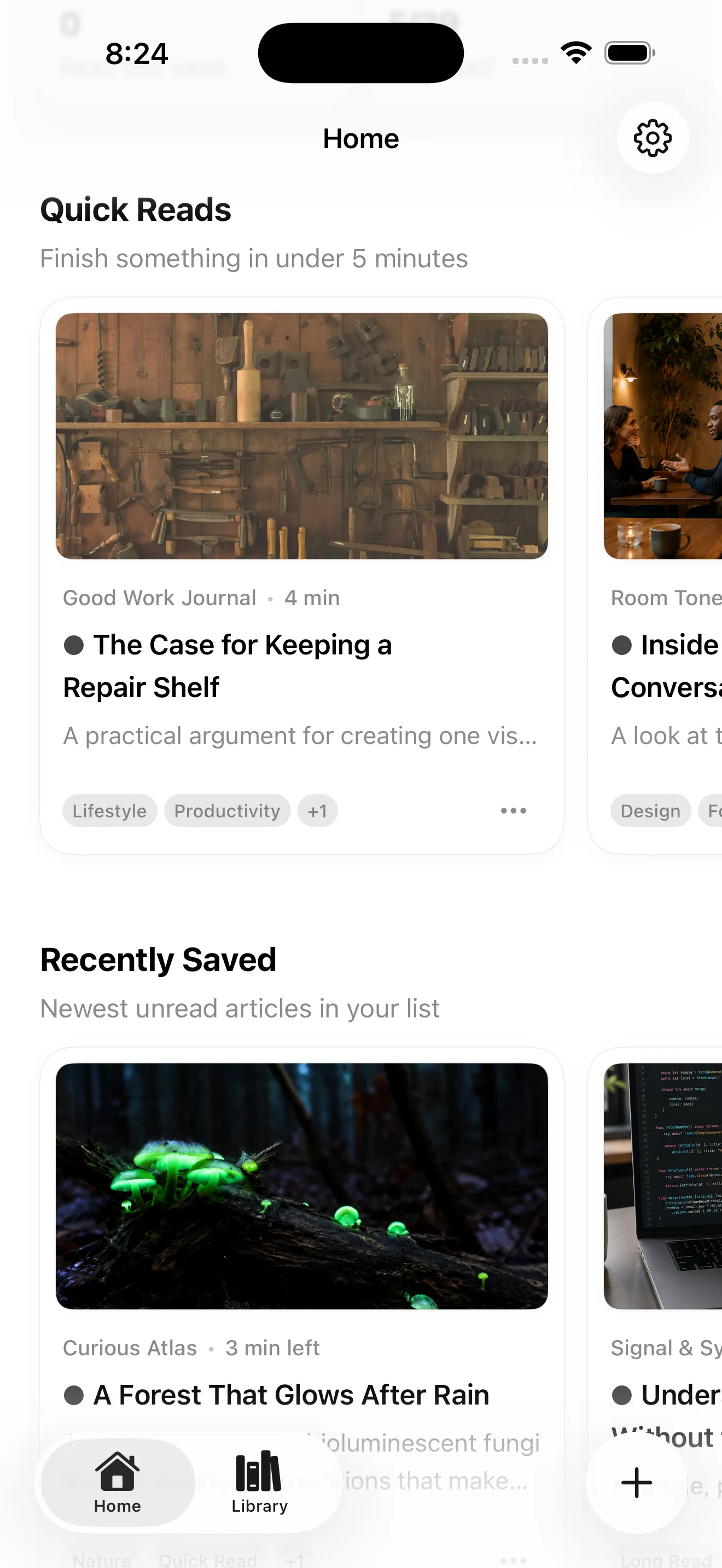
PagePanda’s reading-focused Home divides unread articles into four non-duplicated sections:
| Section | Purpose |
|---|---|
| Continue Reading | Recently opened articles with saved progress |
| Quick Reads | Short articles that may fit limited time |
| Recently Saved | New additions while interest is fresh |
| Backlog Cleanup | Older or never-opened articles worth reconsidering |
This curation is designed to answer “what should I read next?” without requiring you to scroll through hundreds of items or maintain a complex tagging system.
Combined with shelves, tags, search, and archive states, you get organization depth when you need it and simplicity when you do not.
What if your backlog still feels overwhelming?
If triage and organization are not enough, the problem may be volume rather than structure. Consider:
- Saving less. Not every interesting link needs to enter your library. Some articles are better read immediately or left in the browser.
- Shorter reading sessions. Five minutes of actual reading beats zero minutes spent reorganizing.
- A dedicated reading time. Even a small daily anchor—morning coffee, a commute, ten minutes before bed—creates momentum.
- Habit tools without pressure. PagePanda’s streaks, optional reminders, and widgets can keep reading present without turning it into an obligation.
See How to build a reading habit without pressure for a fuller approach to consistency.
Related PagePanda reading guides
- What are Reader Styles? and how article design affects comfort.
- How to read offline on iPhone and iPad for flights and unreliable connections.
- Pocket alternative for iPhone and Mac if you are rebuilding a library after Pocket’s shutdown.
Frequently asked questions
How many saved articles is too many?
There is no universal limit. A backlog becomes a problem when it creates anxiety, makes choosing the next article difficult, or contains mostly articles you no longer want to read. If opening your list feels overwhelming, it is time to triage.
Should you try to read everything you save?
No. Saving expresses interest at a moment in time. Interests change. Archiving or deleting articles you no longer want to read is healthy list maintenance, not failure.
What is the best way to organize a read-later list?
Start simple: use a few broad shelves or folders, add tags only when they help retrieval, and rely on reading state (unread, in progress, read, archived) for workflow. Avoid creating so many categories that organization becomes its own project.
How do you decide what to read next?
Prioritize articles you already started, then short pieces that fit your available time, then recent saves. Older unread items deserve a periodic review rather than automatic priority.
Can PagePanda help manage a backlog?
PagePanda's Home sections—Continue Reading, Quick Reads, Recently Saved, and Backlog Cleanup—are designed to surface approachable next choices from an unread library without showing every item as equally urgent.