PagePanda is a Pocket alternative designed for people who read on iPhone, iPad, and Mac. It helps you save links from other apps, download readable articles for offline access, organize them with shelves and tags, and keep highlights and notes alongside what you read. If you downloaded a Pocket CSV export before Pocket closed exports, PagePanda’s implemented import flow can review and import that file. It is Apple-focused, not an Android or web service.
PagePanda at a glance
| Question | Answer |
|---|---|
| Which devices is PagePanda designed for? | PagePanda is available on iPhone, iPad, and native macOS. |
| How do I save an article? | Use the iPhone or iPad Share Sheet, the Mac Share menu, or paste a URL into PagePanda. |
| Does PagePanda work offline? | Successfully fetched article text and downloaded images can remain available on the device. |
| How do I organize articles? | Use shelves, tags, archive status, highlights, and notes. |
| Can PagePanda import Pocket data? | Yes, if you already have a compatible Pocket CSV export. |
| Can articles and notes be exported? | Articles can be exported from PagePanda. Notes can be exported as plain text, Markdown, or HTML. |
| Does PagePanda sync? | Library sync through your iCloud account is optional. Offline cache files remain device-managed. |
| Are there paid features? | The Free plan includes core features; PagePanda Pro expands limits and adds deeper Insights and reader tools. |
What is a good Pocket alternative for iPhone and Mac?
For someone who uses Apple devices, a good Pocket alternative should make saving effortless, keep articles readable offline, and provide enough organization to prevent a reading list from becoming another inbox. PagePanda is designed around that workflow for iPhone, iPad, and Mac.
The best Pocket alternative in 2026 depends on the devices and features you need. PagePanda is built for readers who want:
- a native app across Apple’s phone, tablet, and desktop platforms;
- a focused reader instead of a collection of browser tabs;
- offline access to downloaded article content and supported images;
- shelves, tags, highlights, and notes in one library;
- an import path for a Pocket CSV file you saved before exports closed; and
- gentle reading-momentum tools such as streaks, reminders, widgets, and achievements.
Is Pocket still available in 2026?
No. Mozilla shut Pocket down on July 8, 2025, and closed its export service and API on November 12, 2025. Pocket’s apps and extensions are no longer supported, and users can no longer request a fresh export from Mozilla.
That distinction matters when reading older migration guides. PagePanda can import a Pocket CSV file that you already possess, but it cannot connect to Pocket or recover data that was not exported before Mozilla’s deadline. Mozilla maintains the official Pocket shutdown timeline and current status.
Even without an old export, PagePanda can become a new home for articles you save. You can send links from Safari, News, Mail, and other apps through the system share controls, or paste a URL directly into the app.
What makes PagePanda different from a bookmark manager?
PagePanda is built for reading, while a traditional bookmark manager is primarily built for storing and retrieving links. Saving the URL is only the beginning of PagePanda’s workflow.
After you save a supported article, PagePanda fetches its readable content and prepares it for the in-app reader. It can cache article images, remember progress, estimate reading time, and place the article into dashboard groups such as Continue Reading and Quick Reads.
While reading, you can highlight passages and attach notes. Notes can be exported as plain text, Markdown, or HTML. Shelves provide broad organization, while tags can describe topics or projects. The result is a reading library rather than a folder of URLs.
Can PagePanda import an existing Pocket library?
Yes. PagePanda’s implemented import flow can read a compatible Pocket CSV file that was downloaded before Pocket’s export service closed. It preserves supported fields including article URLs, titles, saved dates, tags, and archive status.
To import the file:
- Make sure the Pocket CSV file is available in Files or another location your Apple device can access.
- Open PagePanda > Settings > General > Import.
- Choose the Pocket CSV file.
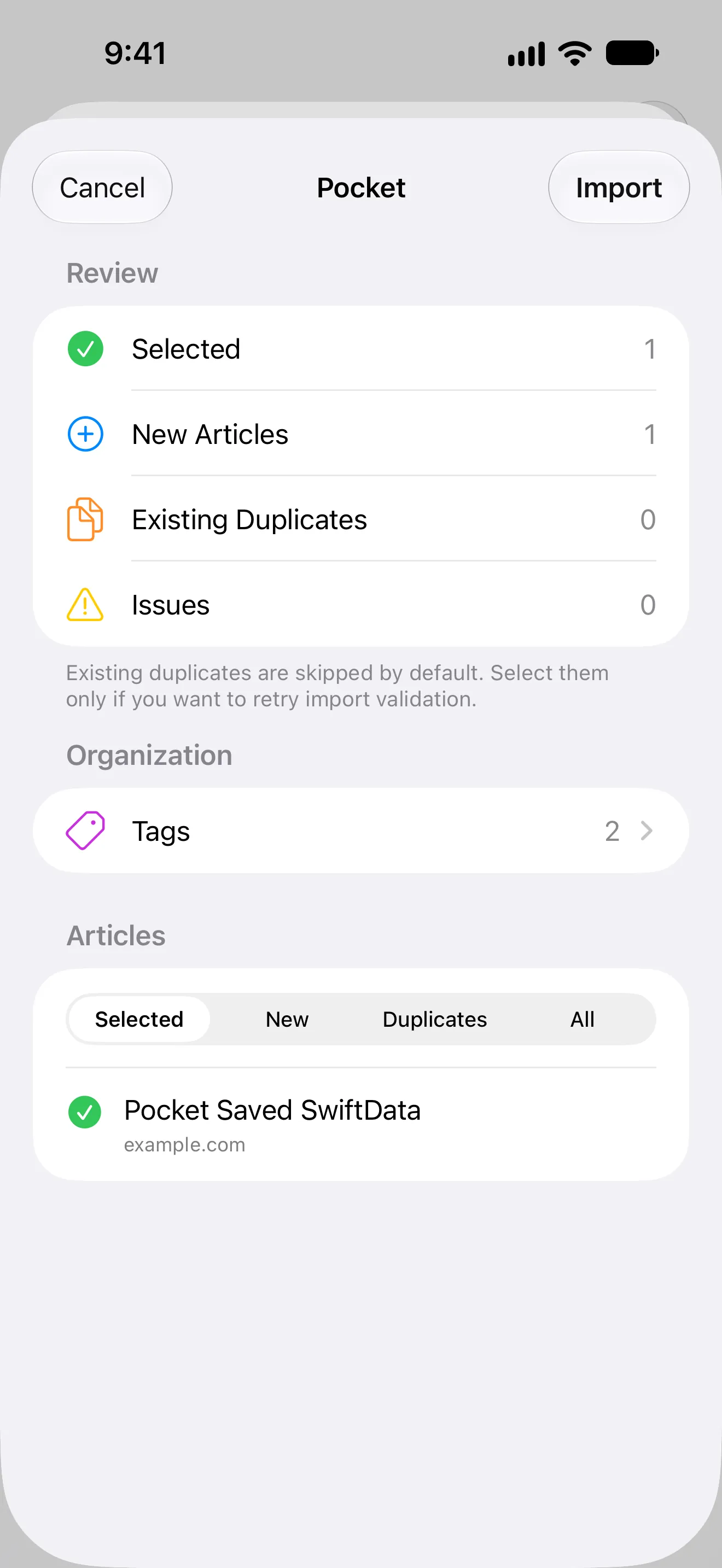
- Review the detected articles, duplicates, and any rows with issues.
- Select what you want to add, then confirm the import.
PagePanda parses the file locally before anything is saved. The review shows new articles, existing-library duplicates, and invalid entries instead of silently adding every row. Existing duplicates are unselected by default.
Importing does not restore Pocket’s cached copies. PagePanda downloads readable content from URLs that remain available; a deleted or inaccessible source page may not be downloadable.
The implemented import tool also accepts supported exports from Instapaper and Raindrop.io, browser bookmark HTML, plain-text URL lists, and generic CSV files. That makes the importer useful beyond a one-time Pocket migration.
Articles already in PagePanda can be exported from the app. That export is separate from Pocket’s closed export service, which PagePanda cannot request or recover for you.
Does PagePanda work offline?
Yes. PagePanda is designed to download and cache readable article content, along with supported article images, so previously cached articles can be opened without a reliable connection. This is intended for flights, commutes, unreliable connections, and deliberate offline reading time.
Offline access depends on the article having completed its download and remaining in the device’s cache. PagePanda includes cache controls and storage management, and clearing the cache removes the local offline copy without removing the saved article from your library.
Library sync and offline storage solve different problems. Optional iCloud sync keeps supported library data available through your iCloud account, while downloaded article files are managed locally on each device. Do not assume that downloading an article on one device automatically places the same offline file on every other device.
The Safari Reading List alternative guide also explains when Apple’s built-in queue may be enough and when a separate reading library becomes useful.
How does PagePanda organize saved articles?
PagePanda is designed to organize saved articles with shelves, tags, reading state, archive status, highlights, and notes. The system can stay simple or grow with your library.
Shelves can cover broad areas such as Work, Weekend Reading, or Research. Tags can cut across them with labels such as design, long read, or recipes. Lists can be sorted by saved date or estimated reading time.
The reader keeps highlights and notes attached to the source article. You do not have to move useful passages into a separate notes app just to remember why they mattered. PagePanda Pro increases the available limits for highlights, tags, and shelves and adds more reader tools and full Insights, while the core organization workflow remains in the Free plan.
Can PagePanda help users finish what they save?
PagePanda is designed to make a backlog easier to act on by showing what to continue, what can be read quickly, and how your reading habit is developing. It cannot create time, but it can reduce the effort required to choose the next article.
The dashboard can surface partially read articles under Continue Reading, short articles under Quick Reads, recent saves, and older backlog items. Reading streaks and achievements make progress visible, while optional reminders and widgets can keep the habit present without requiring you to open the app first.
PagePanda also records reading activity inside the app. Core progress views show current and best streaks, while PagePanda Pro adds full Insights. These features provide feedback rather than requiring a perfect daily record.
Who should—and should not—choose PagePanda?
PagePanda is a Pocket replacement for Apple users who want offline reading, flexible organization, and help turning saved links into finished articles.
PagePanda may suit you if:
- you read primarily on iPhone, iPad, or Mac;
- you want a native read-it-later app rather than a browser-only service;
- offline article access is important;
- you use shelves, tags, highlights, or notes to organize ideas;
- you already have a Pocket CSV file to import; or
- streaks, reminders, and quick-reading suggestions help you build a habit.
PagePanda may not suit you if:
- you need Android support;
- you need to manage your library from a web browser;
- you need PagePanda to retrieve Pocket data that was never exported; or
- you want a social discovery network rather than a personal reading library.
Those boundaries are more useful than declaring one app the best Pocket alternative for everyone.
Related PagePanda reading guides
- Best read-it-later apps for iPhone, iPad, and Mac in 2026 if you are also comparing Instapaper, Matter, and Safari Reading List.
- If your saved pages currently live in Apple’s browser, compare a dedicated app with Safari Reading List on iPhone and Mac.
- If you regularly save tutorials and engineering posts, see what to look for in a read-it-later app for developers.
Frequently asked questions
Is PagePanda a Pocket alternative?
PagePanda is a Pocket alternative for iPhone, iPad, and Mac users who want to save web articles, read cached content offline, organize a personal library, and keep highlights and notes.
Can I move my Pocket articles to PagePanda now?
Yes. You can import a compatible Pocket CSV file that you already possess. Pocket's export service is closed, so PagePanda cannot request or recover an export for you.
Does PagePanda work without the internet?
Yes, after an article has been successfully downloaded and remains cached on the device. Cached readable content and downloaded images can be opened without a reliable connection.
Does PagePanda sync between Apple devices?
PagePanda offers optional library sync through your iCloud account. Offline article cache files remain device-managed, so each device may need to download its own offline copy.
Is PagePanda available on Android or the web?
No. PagePanda is designed for iPhone, iPad, and native macOS, with no Android or web app planned. Readers who require those platforms should choose a cross-platform alternative.
Is PagePanda free or does it require PagePanda Pro?
The Free plan includes core saving, reading, organization, and habit features. PagePanda Pro expands limits and adds more Reader Styles, enhanced code formatting, full Insights, and other Pro capabilities.