Safari Reading List is a good built-in choice when you want a simple queue of webpages inside Safari. A dedicated read-it-later app becomes more useful when you also want saved reading progress, highlights and notes, flexible organization, a designed article reader, or help choosing what to read next. PagePanda is an option for that broader workflow on iPhone, iPad, and Mac.
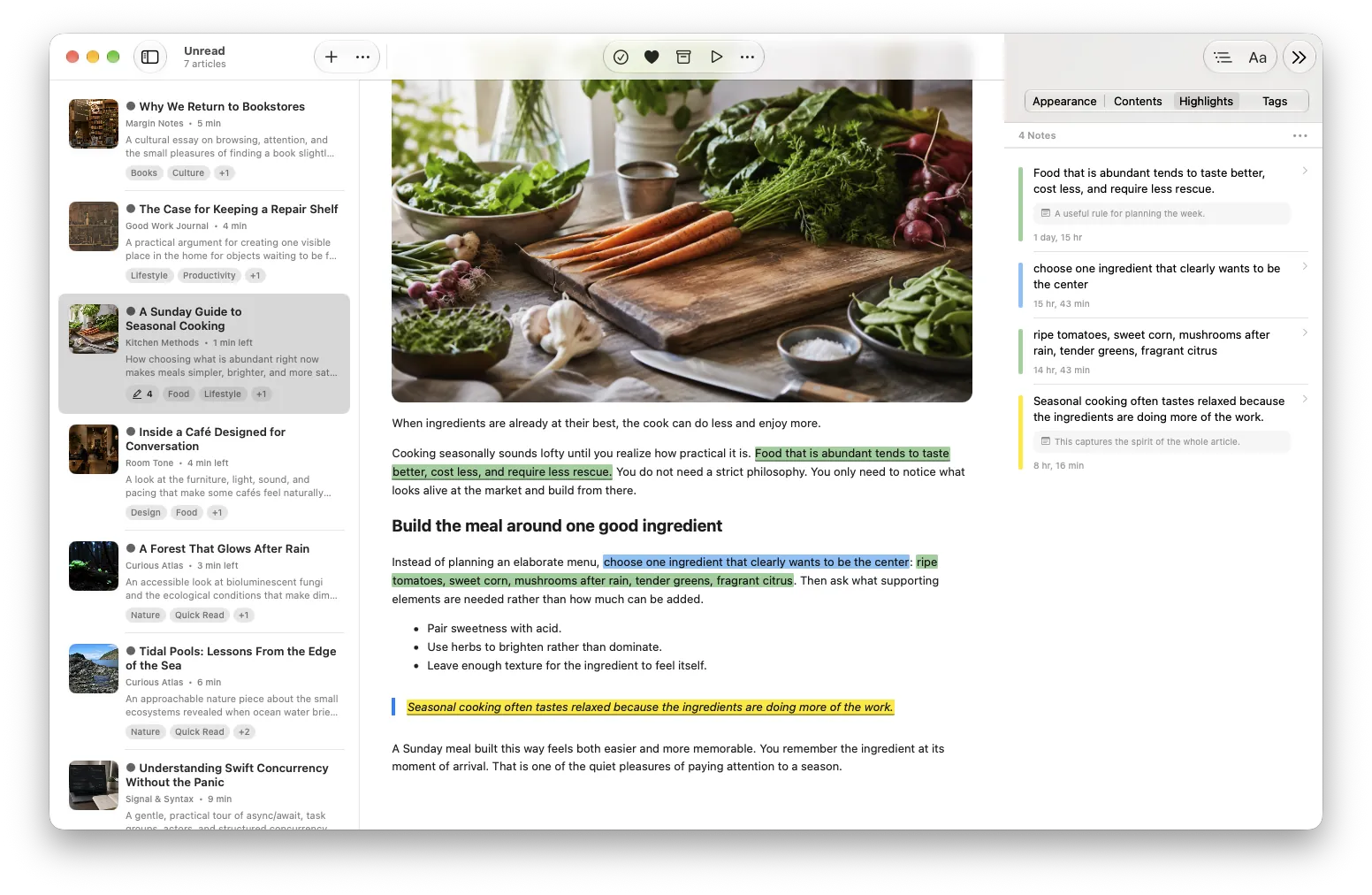
Safari Reading List alternative at a glance
The right choice depends less on how many links you save and more on what you want to do after saving them.
| Need | Safari Reading List | A dedicated app such as PagePanda |
|---|---|---|
| Save a webpage for later | Built into Safari | Save from supported apps through system sharing or paste a URL |
| Read without a connection | Supported for pages saved offline | Supported after readable content and images have been successfully cached |
| Mark items as read | Read and unread states | Unread, read, archived, liked, and recently deleted states |
| Continue an unfinished article | Reopen the page | Restore saved reading position and show Continue Reading |
| Organize a larger library | Search the Reading List on Mac and filter read or unread items | Shelves, tags, search, sorting, and archive tools |
| Keep useful passages | Use other Safari or system tools as needed | Highlights with optional attached notes inside the reading library |
| Change the reading presentation | Safari Reader offers appearance controls on supported pages | Reader Styles can reshape typography, spacing, headings, quotes, lists, tables, and other article elements |
| Build a reading habit | Manage the queue yourself | Quick Reads, Backlog Cleanup, streaks, Achievements, and optional reminders |
Safari Reading List and PagePanda do not need to solve the same problem. Reading List is part of a browser. PagePanda is designed as a personal reading library whose purpose is to help you return to saved articles and finish more of them.
What does Safari Reading List already do well?
Safari Reading List is available without installing another app or creating another service account. On iPhone, Apple lets you add the current page from Safari’s sharing controls or add a linked page without opening it. You can then view the list, mark items as read, or delete them.
Apple also supports offline reading. On iPhone and iPad, the Automatically Save Offline setting can download Reading List pages in advance. On Mac, you can save an individual Reading List item offline or enable automatic offline saving for the complete list. Apple documents these steps in its current guides for Safari on iPhone and Safari on Mac.
When iCloud is configured for Safari, the list can stay available across your Apple devices. On Mac, Safari can search the Reading List, hide pages that have been read, and mark an item read or unread.
Safari Reader addresses a related but separate need. On supported pages, it removes navigation and other surrounding elements and presents the article in a cleaner format. Apple documents controls for the background, font, and text size in Safari Reader on Mac.
For someone who saves a manageable number of pages, reads mainly in Safari, and does not need a separate knowledge or habit system, those tools may be enough.
When does a dedicated read-it-later app become useful?
A Safari Reading List alternative is worth considering when the reading queue has become more than a temporary set of browser links. The difference usually appears in what happens between saving and finishing.
You regularly stop halfway through long articles
Returning to an unfinished article should not require remembering where you stopped. PagePanda saves reading progress, restores the reader position, and can bring partially read articles into a Continue Reading section.
That makes the state of the library more specific than read or unread. An article can remain visibly in progress until you are ready to finish it.
You need more ways to find the right article
A long, chronological list can make every saved item look equally urgent. A dedicated reading app can offer several paths back into the same library.
PagePanda organizes articles with shelves, tags, reading state, archive status, search, and sorting by saved date or estimated reading time. Its Home also creates distinct sections for Continue Reading, Quick Reads, Recently Saved, and Backlog Cleanup. These sections are designed to make the next choice approachable without requiring you to reorganize the entire library first.
The Free plan supports up to five custom shelves and ten tags. PagePanda Pro removes those app-enforced count limits.
You want highlights and notes to stay with the article
Sometimes the valuable part of an article is one argument, instruction, or quotation. PagePanda lets you highlight selected text in the reader and optionally attach a note. You can revisit those highlights later and open the source article at a saved passage.
The Free plan permits up to 25 highlights, including optional notes attached to those highlight records. PagePanda Pro removes that app-enforced highlight limit. Notes can be exported as plain text, Markdown, or HTML.
The appearance of long-form reading matters
Safari Reader provides a cleaner view and useful appearance controls. PagePanda’s Reader Styles take a different approach: they are complete article designs rather than only font or color selections.
A Reader Style can change typography, heading treatment, line height, paragraph spacing, article width, alignment, links, quotations, lists, tables, and visual accents. PagePanda includes the Standard style in the Free plan. PagePanda Pro adds Magazine, Elegant, Modern, Vintage, Minimal, Artistic, and Academic.
Reader Styles are not necessary for saving a link. They matter when a comfortable and engaging reading environment helps you stay with the article.
You want the reading list to support a habit
A browser list can hold articles, but you still decide when to return and what to open. PagePanda adds gentle signals around that decision: reading streaks, Achievements, an optional local reminder, and widgets can make progress visible without treating a missed day as failure.
The goal is not to create another demanding task. It is to reduce the effort needed to begin a small reading session.
What should you compare before choosing an alternative?
Start with your actual reading behavior rather than the longest feature list.
- Saving: Can you save from the apps where you discover articles, not only from one browser?
- Offline behavior: Does the app explain what is downloaded, when it happens, and what remains device-local?
- Progress: Can you return to the same place in a long article?
- Organization: Are read state, archive, search, shelves, or tags available without becoming maintenance work?
- Reader quality: Does the reading view handle headings, lists, quotations, tables, images, and code clearly?
- Active reading: Can useful passages and notes remain connected to their source?
- Privacy: Is an account required, where is the library stored, and which services process data?
- Platform fit: Does the app support every device you genuinely need?
The last question prevents a common mismatch. PagePanda is designed for iPhone, iPad, and native macOS. It is not an Android app or a web service. Someone who needs either platform should choose a cross-platform alternative.
How does PagePanda fit as a Safari Reading List alternative?
PagePanda is available for readers who want a native Apple-platform experience but need more structure after saving. You can add a URL directly, use the Share Sheet on iPhone or iPad, or use the Share menu on Mac. A Save Article App Intent also supports Siri and Shortcuts workflows.
Readable content is fetched on the device and can be cached with supported images for offline access. The personal library is stored locally, and optional iCloud sync can keep supported library data—such as saved items, reading progress, shelves, tags, highlights, and notes—available through your Apple account.
Downloaded article files are different from the synced library. Cache files remain device-managed, so downloading an article on one device should not be treated as a promise that its offline files will appear automatically on every other device.
PagePanda does not require a PagePanda account. It does not use advertising, product-usage analytics, AI processing, or third-party crash reporting. Apple services, source websites, and RevenueCat still play their documented roles, so this does not mean that no information ever leaves the device. The PagePanda Privacy Policy explains those boundaries in detail.
Can Safari and PagePanda be used together?
Yes. Choosing a dedicated reading app does not require abandoning Safari as a browser.
Now that PagePanda is available, Safari can remain where you discover and browse the web. When an article deserves focused reading, you can send it to PagePanda through the system sharing controls. Pages that only need a quick return can stay in Safari Reading List, while longer articles, research, or material you want to annotate can go into PagePanda.
This division keeps both tools simple: Safari for browsing and temporary reading, PagePanda for a reading library you expect to revisit.
PagePanda does not currently promise a direct Safari Reading List migration. Its implemented importer supports browser bookmark HTML, plain-text URL lists, generic CSV, Pocket CSV, Instapaper CSV, Raindrop.io CSV, and a PagePanda backup format. Do not assume a Safari Reading List will be included in an exported bookmark file. Articles already in PagePanda can be exported from the app, and notes can be exported as plain text, Markdown, or HTML.
The practical choice
Keep using Safari Reading List if its built-in queue, offline support, and read state already match your needs. Consider a dedicated read-it-later app when you want to resume unfinished reading, organize a growing library, preserve highlights and notes, or make the reader itself more intentional.
PagePanda is one available option for Apple users who want that broader experience. If you are moving from another service instead, the guide to choosing a Pocket alternative for iPhone and Mac explains PagePanda’s implemented import and offline-reading approach.
Related PagePanda reading guides
- Best read-it-later apps for iPhone, iPad, and Mac in 2026 for Pocket, Instapaper, Matter, and Safari Reading List side by side.
Frequently asked questions
Is Safari Reading List still available?
Yes. Apple currently documents Reading List in Safari on iPhone, iPad, and Mac. It can save webpages for later, track read and unread items, and keep the list available across Apple devices through iCloud.
Does Safari Reading List work offline?
Yes, when offline saving is enabled or an item is explicitly saved offline. Apple provides automatic offline-saving settings on iPhone, iPad, and Mac, but a page must be downloaded before the connection disappears.
Is Reading List different from bookmarks?
Yes. Bookmarks are generally long-term shortcuts to webpages, while Reading List is a queue for pages you intend to read and can mark as read or unread. Both remain useful for different purposes.
Can PagePanda directly import Safari Reading List?
PagePanda does not promise a direct Safari Reading List import. Its implemented importer supports browser bookmark HTML and several other file formats, but Safari Reading List should not be assumed to be included in a bookmark export.
Is PagePanda available on the App Store?
Yes. PagePanda is available on iPhone, iPad, and Mac through the App Store.