Instapaper remains a capable read-it-later service for iPhone, iPad, and Mac, with offline reading, folders, highlights, and a long-established reader. PagePanda is an Instapaper alternative for Apple readers who want complete Reader Styles, a reading-focused Home, gentle habit tools, and local-first storage without a PagePanda account. This guide compares both apps so you can decide which fits your workflow.
Instapaper alternative at a glance
| Question | Instapaper | PagePanda |
|---|---|---|
| Platforms | iPhone, iPad, Mac, web, browser extensions | iPhone, iPad, native macOS |
| Account required | Yes (Instapaper account) | No PagePanda account |
| Offline reading | Yes, for downloaded articles | Yes, for successfully cached articles |
| Organization | Folders and tags | Shelves, tags, archive, liked, and read states |
| Highlights and notes | Yes; unlimited with Premium | Yes; up to 25 highlights in Free, no app-enforced limit in Pro |
| Full-text search | Instapaper Premium | PagePanda Pro (cached article content) |
| Text-to-speech | System and AI voices; Premium playlists and CarPlay | Cached articles, using Apple voices on the device |
| Reader customization | Fonts, themes, spacing | Eight Reader Styles plus themes, fonts, and alignment |
| Import from Instapaper | N/A (source app) | Instapaper CSV import supported |
| Habit tools | Home Screen widget (iOS) | Streaks, Insights, Achievements, reminders, widgets |
| AI features | AI voices in Speak | None; no AI processing of reading data |
Instapaper listening claims were rechecked against the Speak guide on October 18, 2026. Other Instapaper details remain as verified against the Instapaper App Store listing and Instapaper blog on August 8, 2026. PagePanda import, export, and note capabilities in this guide were updated on October 1, 2026.
What is Instapaper?
Instapaper is a read-it-later service that saves web articles for offline, distraction-free reading. It has been available on iOS since 2008 and added a native Mac app in 2020. As of mid-2026, Instapaper 10 for iOS introduced a redesigned interface, Home Screen widgets, new reading fonts, and improved background syncing, according to the Instapaper blog.
Core Instapaper capabilities include:
- saving articles from Safari and other apps;
- offline reading of downloaded content;
- folders and tags for organization;
- highlights and notes;
- font, theme, and spacing controls;
- text-to-speech for listening to articles;
- a web-based library accessible from any browser; and
- browser extensions for Chrome, Firefox, and Safari.
Instapaper Premium, offered as an in-app subscription, adds full-text search, unlimited highlights and notes, a text-to-speech playlist, speed reading, and other features listed on the App Store.
What is PagePanda?
PagePanda is a native reading app for iPhone, iPad, and Mac designed to help people finish what they save. Its purpose is not merely collecting links—it is turning saved articles into finished reading through a comfortable reader, helpful next-read suggestions, and gentle progress tools.
Distinctive PagePanda capabilities include:
- Reader Styles that transform the complete article design—not just fonts or colors.
- A reading-focused Home with Continue Reading, Quick Reads, Recently Saved, and Backlog Cleanup.
- Streaks, Insights, and Achievements that make progress visible without pressure.
- Enhanced code formatting in PagePanda Pro for technical articles.
- Text-to-speech for listening to a saved article.
- Article import and export, with notes exportable as plain text, Markdown, or HTML.
- Local-first storage with optional iCloud sync and no PagePanda account.
- No product-usage analytics, advertising, or AI processing.
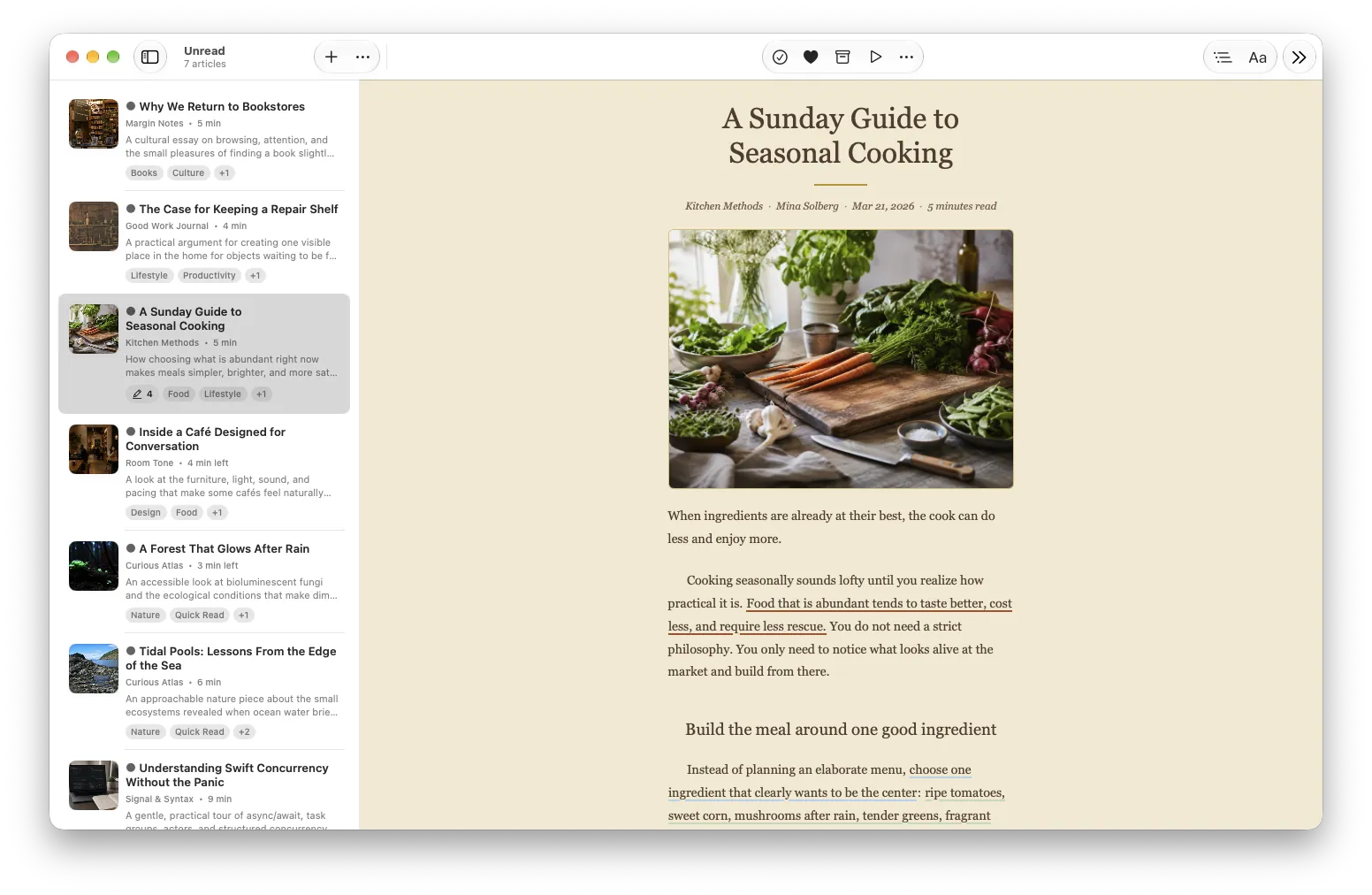
How do Instapaper and PagePanda compare for reading?
Both apps strip away webpage clutter and present articles in a focused reader. The difference is in how deeply the reading experience can be customized and what happens before you open an article.
Reader appearance
Instapaper offers font, color theme, and spacing controls—a well-established approach to reader customization. PagePanda’s Reader Styles go further by reshaping typography, heading treatment, paragraph spacing, quotes, lists, tables, and visual accents as a complete design. Eight styles are implemented: Standard (Free) plus Magazine, Elegant, Modern, Vintage, Minimal, Artistic, and Academic (Pro).
If you care primarily about font size and background color, both apps serve that need. If you want the same article to feel like a magazine feature, an academic paper, or a minimal essay, PagePanda’s styles address that directly.
Choosing what to read next
Instapaper organizes articles into folders and tags with sorting options. Its iOS widget can display in-progress and recently saved articles.
PagePanda’s Home curates unread articles into non-duplicated sections:
- Continue Reading for articles with saved progress.
- Quick Reads for shorter pieces.
- Recently Saved for fresh additions.
- Backlog Cleanup for older unread items worth reconsidering.
This curation is designed to reduce the “what should I read?” decision before you start.
Listening
Instapaper’s Speak guide, checked October 18, 2026, describes system and AI voices, Premium playlists on iOS and Android, and CarPlay. Instapaper Premium also includes speed reading. Those are the reasons to keep Instapaper if listening is a queue you take into the car.
PagePanda can listen to a cached article with an Apple voice installed on the device. Listen does not require PagePanda Pro, and it does not use a cloud AI voice, a playlist, or CarPlay. A YouTube video and a podcast episode are played rather than read aloud, and you can attach a timestamp note when playback stays inside PagePanda. The YouTube notes guide covers those limits.
How do organization and search compare?
| Capability | Instapaper | PagePanda |
|---|---|---|
| Folders / shelves | Folders | Custom shelves (up to 5 in Free) |
| Tags | Tags | Tags (up to 10 in Free) |
| Archive | Archive | Archive, liked, read, and recently deleted states |
| Sorting | By popularity, date, length | By saved date and estimated reading time |
| Title search | Yes | Yes (Free) |
| Full-text search | Instapaper Premium | PagePanda Pro (cached content) |
| Highlights | Limited on free tier; unlimited with Premium | Up to 25 in Free; no app-enforced limit in Pro |
Both apps keep highlights attached to articles. PagePanda notes can be exported as plain text, Markdown, or HTML. On an audio or video article, a note can include a timestamp. PagePanda Pro also adds Find in Article and table-of-contents heading navigation for long pieces.
Can you import from Instapaper to PagePanda?
Yes. PagePanda supports importing a compatible Instapaper CSV export alongside Pocket CSV, Raindrop.io CSV, browser bookmark HTML, plain-text URL lists, and generic CSV files.
To import:
- Export your library from Instapaper as CSV.
- Open PagePanda > Settings > General > Import.
- Select the Instapaper CSV file.
- Review detected articles, duplicates, and any rows with issues.
- Confirm the import.
The import parses the file locally. PagePanda does not upload your export to a server. Imported articles still need to be downloaded individually for readable content and offline access—importing restores library metadata, not cached copies from Instapaper.
PagePanda can also export articles from your library.
How do offline reading and sync differ?
Both apps download article content for offline reading, subject to successful extraction from the source page.
Instapaper syncs your library through your Instapaper account across its supported platforms, including the web.
PagePanda stores your library locally on each device with optional iCloud sync through your Apple account. No PagePanda account is required. Downloaded article cache files remain device-managed, so offline copies may need to be fetched separately on each device even when library metadata syncs.
How do privacy and accounts compare?
Instapaper requires an Instapaper account and syncs your library through its service. Its privacy policy describes how Instapaper handles user data.
PagePanda works without a PagePanda account. Your library is stored on your device, with optional iCloud sync through Apple’s private CloudKit container. PagePanda does not use product-usage analytics, advertising, or AI processing of your reading data. Purchase validation uses RevenueCat and Apple services as described in the PagePanda Privacy Policy.
Neither app is “more private” for every person—the right choice depends on whether you prefer a cloud-synced account model or a local-first Apple approach.
Who should choose Instapaper?
Instapaper may suit you if:
- you want AI voices, a listening playlist, CarPlay, or speed reading;
- you need a web-based library accessible from any browser;
- you use browser extensions on Chrome, Firefox, or non-Apple platforms;
- you already have a well-organized Instapaper library you are happy with; or
- Instapaper’s folder-and-tag workflow matches how you think about saved reading.
Who should choose PagePanda?
PagePanda may suit you if:
- you read primarily on iPhone, iPad, and Mac;
- you want complete Reader Styles, not just font and color changes;
- a reading-focused Home with Continue Reading and Quick Reads would help you act on your backlog;
- streaks, Insights, and Achievements would support your habit without pressure;
- you prefer local-first storage with optional iCloud sync and no PagePanda account;
- you value an app without product-usage analytics or AI processing; or
- you save technical articles and want enhanced code formatting in PagePanda Pro.
PagePanda does not suit readers who need Android, a web app, AI voices, listening playlists, CarPlay, speed reading, or AI-generated summaries.
Related PagePanda reading guides
- Best read-it-later apps for iPhone, iPad, and Mac in 2026 for a wider comparison with Pocket, Matter, and Safari Reading List.
- What are YouTube notes? for timestamp notes and on-device article listening.
- Pocket alternative for iPhone and Mac if you are migrating from a discontinued service.
- Safari Reading List alternative if your saved pages live in Apple’s browser.
- How to build a reading habit without pressure for calmer consistency.
Frequently asked questions
Is PagePanda an Instapaper alternative?
PagePanda is an Instapaper alternative for readers on iPhone, iPad, and Mac who want native Apple apps, complete Reader Styles, a reading-focused Home, and local-first storage without a PagePanda account.
Can PagePanda import Instapaper articles?
Yes. PagePanda can import a compatible Instapaper CSV export. The import runs locally and lets you review detected articles, duplicates, and invalid rows before confirming.
Does Instapaper have features PagePanda does not?
Instapaper offers system and AI voices, Premium text-to-speech playlists, CarPlay, speed reading, a web-based library, and browser extensions. PagePanda listens to cached articles with Apple voices on the device. It does not include AI voices, playlists, CarPlay, speed reading, or a web app, and it is limited to iPhone, iPad, and native macOS.
Does PagePanda have features Instapaper does not?
PagePanda offers eight complete Reader Styles that reshape article layout, a reading-focused Home with Continue Reading and Quick Reads, reading streaks with a heatmap in Pro, personal Insights, and 29 Achievements. It also works without a PagePanda account and does not use product-usage analytics.
Which app is better for privacy?
Both apps store reading data for the user, but they work differently. PagePanda stores your library locally with optional iCloud sync and does not require a PagePanda account or use product-usage analytics. Instapaper operates as a cloud-synced service with an account. Compare each app's current privacy policy for details.
Is PagePanda free?
PagePanda includes core saving, reading, organization, and habit features in the Free plan. PagePanda Pro expands limits and adds more Reader Styles, enhanced code formatting, full Insights, and other Pro capabilities. Pricing is shown in the App Store.