YouTube notes means three different things: an AI summary, a transcript of the video, or a note you type at a timestamp. PagePanda keeps the third kind. It opens one YouTube video in YouTube’s player on iPhone, iPad, and Mac, and stores a plain-text note at the current moment so you can jump back to it later.
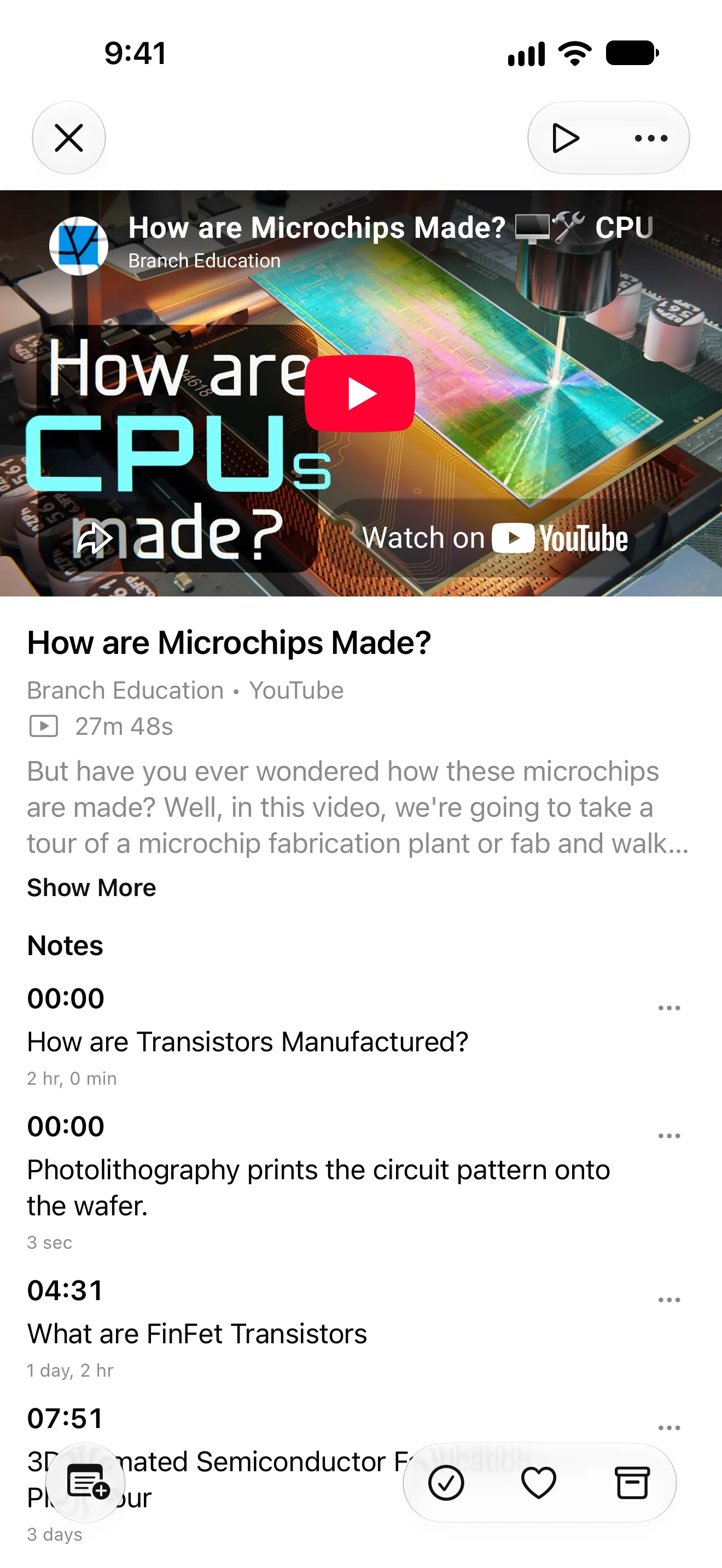
YouTube notes at a glance
| Question | Answer |
|---|---|
| What are people usually looking for? | An AI summary, a transcript, or a note attached to a moment in the video. |
| What does PagePanda keep? | A note you write, stored with the playback time. |
| How do you return to that moment? | Tap the timestamp on the note. |
| Does PagePanda summarize or transcribe YouTube? | No. It does not generate notes or a transcript. |
| Is the video downloaded? | No. Playback uses YouTube’s player and needs a connection. |
| Where else can the note live? | In Library Notes, and in a plain-text, Markdown, or HTML export. |
Listening, YouTube, and podcast behavior described here matches PagePanda as implemented on October 18, 2026. Competitor details were checked the same day against the linked primary sources.
What are YouTube notes?
Search results for YouTube notes mix three jobs that sound alike and work differently.
An AI summary turns the video into generated notes, often labeled a generator, maker, or summarizer. The page produces text you did not write. That can be a fast skim. It can also miss the reason you saved the video, and it sends the video or its captions to whatever service does the summarizing.
A transcript is the words spoken in the video, sometimes with times attached. YouTube can show captions on a video that has them. Separate transcript tools extract or generate that text. A transcript helps you search for a phrase. It is not a note about why the moment mattered.
A timestamp note is your own sentence, saved with the playback time. Tap it later and the video returns to that second. This is the useful record when the point was a recipe step, a definition, a quote, or a minute of a lecture you will want again.
PagePanda is built for the third job, inside the same library as your articles. Save a single YouTube video link—a watch page, a short link, a Short, a live video, or an embed with one video ID. Playlists, channels, and search pages are not opened in the video player. The video plays in YouTube’s official player. PagePanda remembers the resume position. Choose Add Note at the moment you care about. The note is plain text, kept with that video, and listed with your other notes.
PagePanda does not generate a summary, create a YouTube transcript, download the file, or follow a channel.
Other apps answer a narrower version of the same request. YTV Pro’s App Store listing, checked October 18, 2026, describes a video notebook: paste a link, write a note at a timestamp, and tap it to jump back. A later update on that listing also mentions AI-powered note summaries. Matter’s App Store listing, checked the same day, says Matter can save YouTube and offers podcast transcriptions with synced playback, alongside article text-to-speech. Those are different products from a manual note in a read-later library.
How do I take notes on a YouTube video with a timestamp?
Write the note while the moment is still on screen. A timestamp you add later, from memory, is the one you will not find again.
In PagePanda:
- Save the video link from the share sheet, or add it in the app, the same way you save an article.
- Open the video. Playback starts when you press play. PagePanda does not autoplay it.
- Pause on the moment you want to keep, or stay on it while it plays.
- Choose Add Note and type what you want to remember. PagePanda stores the current time with the text.
- Tap that time later, on the video or in Library Notes, to seek back.
- To take the notes out of the app, open Library Notes or Settings > Export and choose Export Notes. Plain text is included. Markdown and HTML require PagePanda Pro.
A useful note says why the moment matters, not only that it exists. “The ratio is at 12:40” is easier to reuse than “interesting.” The timestamp already records where it was.
You can filter the library to Videos when you want the queue without articles and podcast episodes. The video itself still streams from YouTube, so notes are available on the device while playback needs a connection.
Can an app turn a YouTube video into notes?
Yes, if the app is a converter. Queries such as “youtube video to notes” and “video notes ai” usually mean: paste a link and receive a generated summary or a transcript. Those tools are a reasonable choice when you want a skim before you decide to watch, or a searchable text of a video you will not rewatch.
PagePanda does not convert a video into notes. It will not invent a summary, pull captions into an article, or send the video to an AI provider. Your note is the text you typed.
Choose a converter when the output you want is generated text. Choose a timestamp note when the output you want is your own reminder, attached to the second you will replay. You can use both: skim a summary somewhere else, then save the video in PagePanda and mark the minute you actually need.
How do I listen to a saved article on iPhone?
Listening is a separate job from YouTube notes. A text-to-speech article reader reads a saved article aloud. It does not turn a video into notes.
In PagePanda, open an article after it has downloaded, then tap Listen. PagePanda reads it with an Apple voice installed on that iPhone, iPad, or Mac. Enhanced Apple voices can be used when they are installed in system settings. You can change speed and voice, skip by sentence or paragraph, and follow the passage being spoken. Close the player view and the article keeps playing. Listen again later and it resumes. Listening does not require PagePanda Pro.
The limits are specific:
- The article has to be cached first. Listen stays unavailable until the download finishes.
- Voices are Apple’s on-device voices. PagePanda does not offer a cloud AI voice library.
- Podcasts and YouTube videos do not get a Listen button. You play those directly.
- PagePanda does not read PDFs or photos, queue articles into a playlist, or support CarPlay.
Instapaper’s Speak guide, checked October 18, 2026, describes system and AI voices, Premium playlists on iOS and Android, and CarPlay. Matter’s listing describes human-like text-to-speech, with HD voices included in Matter Premium. PagePanda fits readers who want a saved article read by a voice already on the device, without an account or an AI voice service.
How do I take notes on a podcast episode?
Podcast notes in PagePanda are timestamp notes on an episode you saved, not a subscription and not an AI summary.
Save an episode link from Apple Podcasts or Spotify, or a direct public audio URL. PagePanda treats that episode as audio.
- When it can verify a public audio stream, the episode plays inside PagePanda. You can scrub, jump back 15 seconds, jump forward 30 seconds, change speed, and choose Add Note at the current time. Tap the time later to seek.
- When the episode stays with the provider, PagePanda shows the details and an action to open it in Apple Podcasts or Spotify. Those screens do not take timestamp notes, because playback is outside the app.
- If the publisher included a Podcasting 2.0 transcript, Transcript can show it. Timed lines can be tapped to seek. PagePanda does not create a transcript when the publisher did not provide one.
- PagePanda does not follow a show, import a feed, build a queue, advance to the next episode, or download the audio file.
Snipd, checked October 18, 2026, is the other kind of podcast notes app: a headphone tap creates an AI snip with audio, a transcript, and a summary, and its site also says it can import YouTube videos. That is a good fit when you want generated highlights. PagePanda is a fit when you want one episode in the same library as your articles, with a sentence you wrote at a time you chose.
Can I save a YouTube video without downloading it?
Yes. A saved YouTube link in PagePanda is a library item, not a file. The official player streams it. PagePanda stores the title, channel, duration, and description it can read from the watch page, plus your resume position and notes. It does not copy the video onto the device, and it does not label the video available offline.
“Save YouTube videos to the camera roll” and “save YouTube videos for offline” are download questions. PagePanda is the wrong tool for those. Use it when you want the video beside the articles you meant to finish, and a way back to the minute that mattered.
The same boundary applies to podcast audio. Artwork and a publisher transcript can be stored after you request them. The episode audio is streamed, not kept as an offline download.
Takeaway
YouTube notes is a crowded phrase because it covers summaries, transcripts, and timestamp notes. Decide which of the three you want before you pick an app. PagePanda answers the timestamp-note version for a single YouTube video, and it can do the same for a podcast episode that plays inside the app. For articles, Listen reads a cached page with an Apple voice on your device.
If you are comparing read-later apps more broadly, the Matter alternative and Instapaper alternative guides cover HD voices, AI tools, and web libraries. The best read-it-later apps for iPhone, iPad, and Mac roundup places those choices next to Safari Reading List.
Related PagePanda reading guides
- Matter alternative for iPhone and Mac for HD voices, transcriptions, and AI features.
- Instapaper alternative for iPhone and Mac for playlists, CarPlay, and a web library.
- Best read-it-later apps for iPhone, iPad, and Mac in 2026 for a wider comparison.
Frequently asked questions
What are YouTube notes?
YouTube notes usually means one of three things: an AI summary of a video, a transcript of what was said, or a note you type yourself at a specific moment. PagePanda keeps the third kind. It opens one YouTube video in YouTube's player and saves a plain-text note at the current time. Tapping the note jumps back to that moment. PagePanda does not generate a summary, create a transcript, download the video, or follow channels and playlists.
How do I take notes on a YouTube video with a timestamp?
Save the video link in PagePanda, open it, and play to the moment you want to keep. Choose Add Note. PagePanda stores the note with the current playback time. Later, open the note from the video or from Library Notes and tap the time to seek back. From Library Notes or Settings > Export, Export Notes can save them as plain text, or as Markdown or HTML with PagePanda Pro.
Can an app turn a YouTube video into notes?
Some apps and websites advertise YouTube-video-to-notes converters that summarize or transcribe a video with AI. PagePanda does not do that. It saves the video link, plays it in YouTube's official player, and keeps the notes you write at timestamps. If you want a generated summary, use a tool that states it creates one. If you want your own words attached to the moment, write the note while you watch.
How do I listen to a saved article on iPhone?
Open a saved article in PagePanda after it has been downloaded, then tap Listen. PagePanda reads the article with an Apple voice installed on the device, follows the passage being spoken, and resumes later. Listening works offline once the article is cached and does not require PagePanda Pro. It does not read PDFs or photos, use a cloud AI voice library, build a listening playlist, or work in CarPlay.
How do I take notes on a podcast episode?
Save an Apple Podcasts or Spotify episode link, or a public audio URL, in PagePanda. When a public audio stream can be played inside the app, choose Add Note at the current time and tap that time later to jump back. If the episode stays with Apple Podcasts or Spotify, PagePanda opens it there and does not attach a timestamp note. PagePanda can show a transcript when the publisher supplied one. It does not generate a transcript, subscribe to shows, queue episodes, or download audio.
Can I save a YouTube video without downloading it?
Yes. Saving a YouTube link in PagePanda keeps the video in your library and plays it through YouTube's player. PagePanda does not download the video file, and the video is not available offline. Resume position is remembered so you can continue later while you are online.